
TaskRun2016.4 - Download
You'll be able to download in few seconds.
Publisher Description
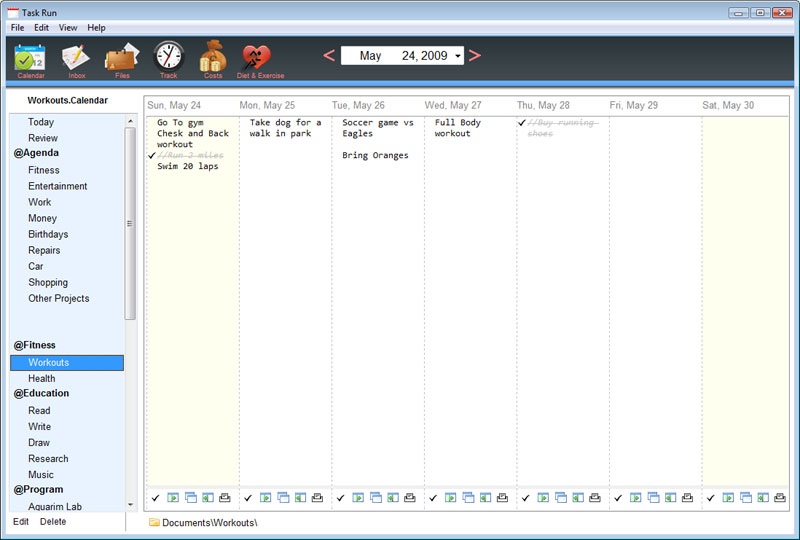
Free up your time and simplify your life. Go plan your next week using Weekly Calendar Planner
Organizing your daily Tasks can reduce stress, lead to more free time and more happiness in your life. Weekly Planner makes it easier for you to record and analyze your week ahead.
Easy Data Entry:
Your week in planned out on single page. Just select the right column and type. Unfinished items can be crossed off, deleted copied and pasted to next day, as easy as using notepad.
Why Flash Cards?
Weekly Planner allows you to print each day individually on a 3x5 index card. This makes caring your list of events very easy. A flashcard is thinner than an ipod, flexible, fits in your pocket and is ultimately disposable. Should you need to add things to your list during the day, just write it using a pen.
Easy Printing
Weekly Planner was designed to print on Flash Cards or 3x5 index cards. Packs of Flash Card's can be purchased in Dollar stores or at Walmart. Most printers support printing on flash cards. Simply insert the flash card into your printer and click print. Printing on regular paper is also supported by Weekly Planner. The printed paper easily fits in your hand, or pocket.
Project Planning
Weekly Planner was also designed to help you take on the big projects in your life. Each project can have a calendar, a to do list, a balance Sheet for tracking money, and a time tracker for keeping track of time spent. A project also gets it's own documents directory where you can keep related files.
Diet and Health:
The program comes with many tool to improve your health.
Calorie Tracker : Calculate your daily caloric intake with a 5000+ food database.
Exercise: Plan and Track your exercise program.
Health: Track your blood pressure, sleeping patterns and doctor appointments
About TaskRun
This PIMS & Calendars program is available in English. It was last updated on 29 September, 2026. TaskRun is compatible with the following operating systems: Windows.
The company that develops TaskRun is SeaApple Software. The latest version released by its developer is 2016.4.
The download we have available for TaskRun has a file size of 8.4 MB. Just click the green Download button above to start the downloading process. The program is listed on our website since 2016-10-15 and was downloaded 0 times. We have already checked if the download link is safe, however for your own protection we recommend that you scan the downloaded software with your antivirus. Your antivirus may detect the TaskRun as malware if the download link is broken.
How to install TaskRun on your Windows device:
- Click on the Download button on our website. This will start the download from the website of the developer.
- Once the TaskRun is downloaded click on it to start the setup process (assuming you are on a desktop computer).
- When the installation is finished you should be able to see and run the program.
Program Details
System requirements
Download information
Pricing
Version History
version 2016.4
posted on 2016-10-15
UI Improvments
Pomodoro Timer
version 2011
posted on 2010-12-02
Changed program name from "Weekly Planner" to "Weekly Calendar Planner"
Added an ability to email or send as a text message a days tasks
Disclaimer
External Download
We do not host TaskRun on our servers. We did not scan it for viruses, adware, spyware or other type of malware. This app is hosted by the software publisher and passed their terms and conditions to be listed there. We recommend caution when installing it.
The external download link for TaskRun is provided to you by apps112.com without any warranties, representations or guarantees of any kind, so access it at your own risk.
If you have questions regarding this particular app contact the publisher directly. For questions about the functionalities of apps112.com contact us.
